What Is a Checkpoint in ComfyUI?
A plain-English explanation of ComfyUI checkpoints, how they define image style and capability, and how SD1.5, SDXL, and Flux differ.
Quick answer
In ComfyUI, the checkpoint is the core model that defines the image generation system. It controls the model family, visual range, default style tendencies, and what kinds of prompts are likely to work well.
Recommended workflow
- 01
A checkpoint is the main image model: In ComfyUI, the checkpoint is the core model that defines the image generation system. It controls the model family, visual range, default style tendencies, and what kinds of prompts are likely to work well.
- 02
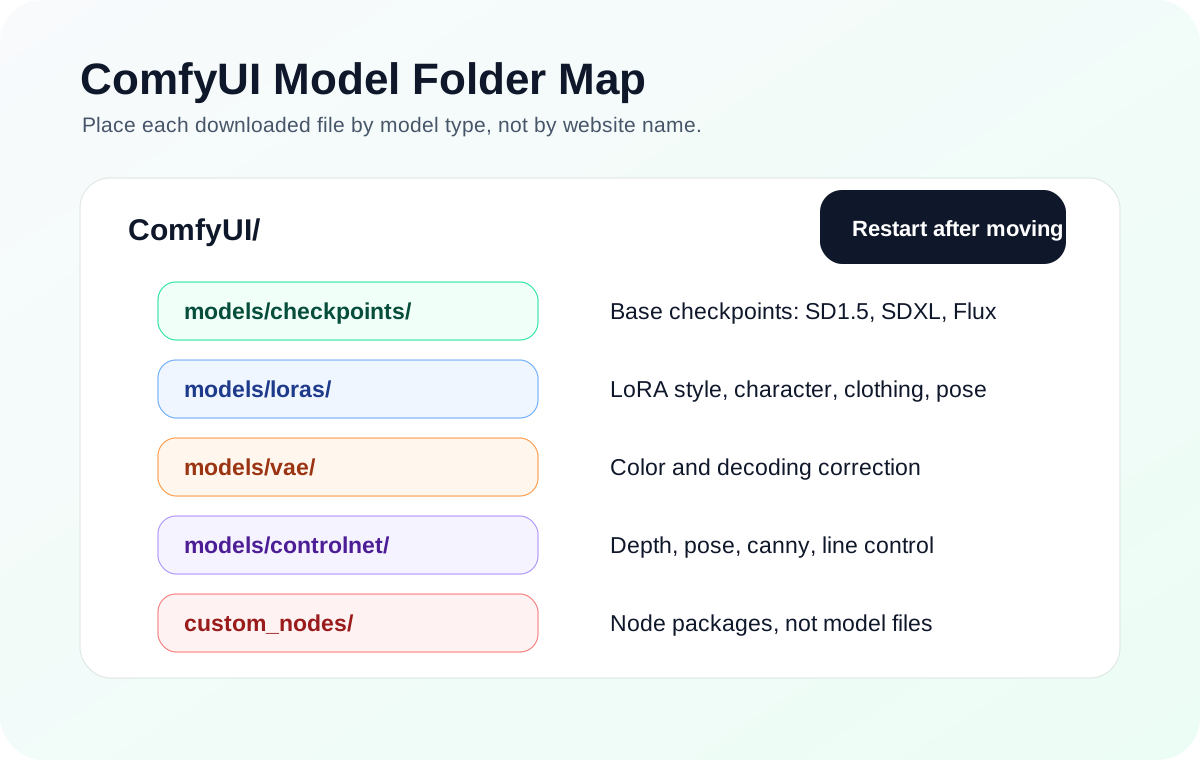
Put checkpoints in the checkpoint folder: Checkpoint files normally go in models/checkpoints. After moving a file, restart ComfyUI and select it in the Checkpoint Loader dropdown. If it does not appear, confirm that the file is complete, not inside a zip archive, and not a LoRA or VAE mislabeled as a checkpoint.
- 03
Pick the model family before importing workflows: A workflow designed for SDXL may not work with an SD1.5 checkpoint. A Flux workflow may require different text encoders or loader nodes. Choose the checkpoint family first, then follow workflows built for that family.
- 04
Do not judge a checkpoint from one prompt: A checkpoint has tendencies, not magic defaults. One prompt can fail because the wording, resolution, sampler, or negative prompt does not fit that model. Test a small known-good workflow before deciding the model is bad.
Full tutorial notes
A checkpoint is the main image model
In ComfyUI, the checkpoint is the core model that defines the image generation system. It controls the model family, visual range, default style tendencies, and what kinds of prompts are likely to work well.
When beginners say a workflow needs a model, it usually means it needs a checkpoint. Without a selected checkpoint, the basic text-to-image chain cannot begin.
Use this mental model: checkpoint first, then LoRA if you need a character or style, then VAE, ControlNet, upscale, or other specialized models only when the workflow asks for them.
- SD1.5 checkpoints are lighter and widely supported.
- SDXL checkpoints are higher quality but need more VRAM.
- Flux workflows often require a different loader structure.
- A .safetensors extension does not prove the file is a checkpoint.
Put checkpoints in the checkpoint folder
Checkpoint files normally go in models/checkpoints. After moving a file, restart ComfyUI and select it in the Checkpoint Loader dropdown. If it does not appear, confirm that the file is complete, not inside a zip archive, and not a LoRA or VAE mislabeled as a checkpoint.
Do not rename unrelated files to match a shared workflow. Choose a compatible checkpoint from the dropdown and adjust the workflow if necessary.
Pick the model family before importing workflows
A workflow designed for SDXL may not work with an SD1.5 checkpoint. A Flux workflow may require different text encoders or loader nodes. Choose the checkpoint family first, then follow workflows built for that family.
If a workflow fails after you swap the checkpoint, the issue may be family mismatch rather than a broken install. Check whether the LoRA, VAE, ControlNet model, sampler settings, and resolution were intended for the same family.
- Checkpoint sets the family.
- LoRA must match that family.
- Workflow loaders must match that family.
- Only then tune prompt and sampler settings.
Do not judge a checkpoint from one prompt
A checkpoint has tendencies, not magic defaults. One prompt can fail because the wording, resolution, sampler, or negative prompt does not fit that model. Test a small known-good workflow before deciding the model is bad.
For troubleshooting, compare two checkpoints with the same seed, prompt, and image size. If style changes but the graph runs, the install is healthy. If the dropdown is empty or the graph errors, fix file placement or model family first.
Check before you run
- Decide the model family before choosing workflows or LoRAs.
- Confirm the file appears in the Checkpoint Loader dropdown.
- Test with one small prompt before judging style quality.
Common mistakes
- Treating every .safetensors file as a checkpoint.
- Mixing SD1.5 LoRAs with SDXL checkpoints and blaming the prompt.
- Replacing a workflow checkpoint without checking loader family compatibility.
Success standard
- The checkpoint loads without traceback.
- Changing checkpoints changes the base style while the graph still runs.
- The selected LoRA and workflow family match the checkpoint family.
What to do next
- Read the LoRA guide before stacking adapters.
- Keep one stable checkpoint as your baseline.
- Use model file paths to sort every downloaded model by type.
Finished this guide? Return to the main path
If this guide solved a specific issue, return to the beginner setup, model path, CUDA VRAM, or workflow import route to keep going.
Need more context?
This English guide gives the direct working path first. The paired Chinese reference can provide extra screenshots, local download notes, and longer troubleshooting branches for the same topic.