ComfyUI ControlNet Low VRAM Guide
Use ControlNet in ComfyUI with low VRAM settings for 8GB GPUs, SDXL ControlNet workflows, Canny, Depth, OpenPose, weight tuning, and CUDA out of memory prevention.
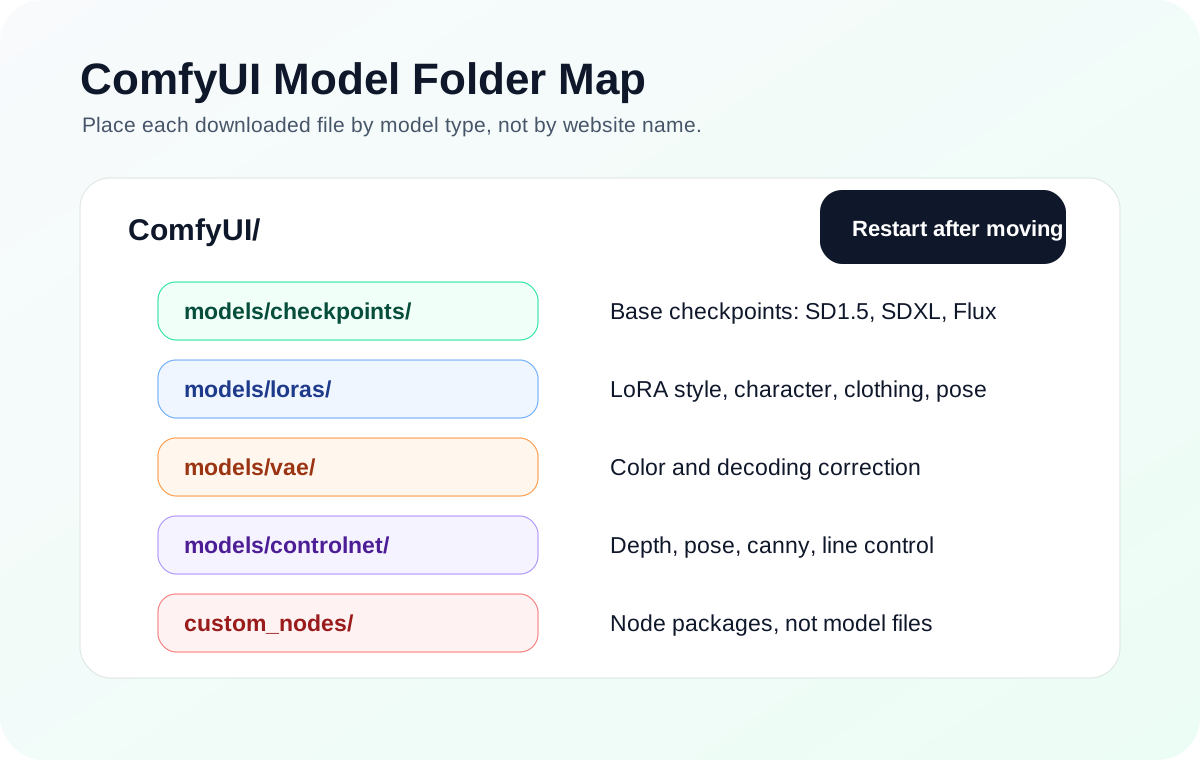
Quick answer
ControlNet is a structural control branch, and every branch adds VRAM pressure. On an 8GB GPU, do not begin with SDXL plus several ControlNet branches, IPAdapter, and upscale in the same workflow.
Recommended workflow
- 01
ComfyUI ControlNet low VRAM basics: ControlNet is a structural control branch, and every branch adds VRAM pressure. On an 8GB GPU, do not begin with SDXL plus several ControlNet branches, IPAdapter, and upscale in the same workflow.
- 02
Match the preprocessor, model, and model family: A Canny preprocessor should pair with a Canny ControlNet model. OpenPose should pair with an OpenPose model. Depth should pair with a depth model. The model also needs to match the base family, such as SD1.5 or SDXL.
- 03
8GB ControlNet decision path: For an 8GB GPU, prove only one control branch at a time. Use Canny for hard edges, OpenPose for body pose, Depth for camera and spatial structure, and Lineart or Scribble for line-driven image generation.
- 04
Route ControlNet failures by symptom: An empty ControlNet dropdown is usually a folder or model-type problem. A shape mismatch is usually a base-family problem. A messy preprocessor image is an input or preprocessor problem. CUDA out of memory after adding ControlNet is a workload-size problem.
- 05
SDXL ControlNet on 8GB VRAM: SDXL ControlNet can be too heavy for an 8GB beginner baseline when it is combined with large resolution, multiple adapters, high-res fix, or video nodes. Prove the SDXL base workflow first, then add one ControlNet branch.
- 06
Treat strength as obedience, not image quality: Higher ControlNet weight makes the image obey the condition more strongly, but it can also make the result stiff, over-traced, or unnatural. Start around the default range and adjust gradually.
Full tutorial notes
ComfyUI ControlNet low VRAM basics
ControlNet is a structural control branch, and every branch adds VRAM pressure. On an 8GB GPU, do not begin with SDXL plus several ControlNet branches, IPAdapter, and upscale in the same workflow.
Start with one checkpoint, one preprocessor, one ControlNet model, batch size 1, and a conservative resolution. If the run already fails with CUDA out of memory, use the OOM guide instead of reinstalling ControlNet first.
- Use one ControlNet branch while testing.
- Keep batch size at 1.
- Use smaller input and latent sizes first.
- Separate upscale into another workflow.
- Match SD1.5 ControlNet models with SD1.5 and SDXL ControlNet models with SDXL.
Match the preprocessor, model, and model family
A Canny preprocessor should pair with a Canny ControlNet model. OpenPose should pair with an OpenPose model. Depth should pair with a depth model. The model also needs to match the base family, such as SD1.5 or SDXL.
If ControlNet appears to do nothing, inspect the preprocessor output first. A bad pose skeleton, noisy edge map, or broken depth map gives the ControlNet model bad instructions before generation even starts.
8GB ControlNet decision path
For an 8GB GPU, prove only one control branch at a time. Use Canny for hard edges, OpenPose for body pose, Depth for camera and spatial structure, and Lineart or Scribble for line-driven image generation.
If you need precise pose plus edge control, test OpenPose alone first, then add Canny only after the base run is stable. If ControlNet and IPAdapter are both present, test one of them first so a failure does not hide which branch crossed the VRAM limit.
- Canny: product edges and architecture outlines.
- OpenPose: body pose and character placement.
- Depth: scene layout and foreground-background structure.
- Lineart or Scribble: sketch-to-image and coloring workflows.
- ControlNet plus IPAdapter: advanced, test separately first.
Route ControlNet failures by symptom
An empty ControlNet dropdown is usually a folder or model-type problem. A shape mismatch is usually a base-family problem. A messy preprocessor image is an input or preprocessor problem. CUDA out of memory after adding ControlNet is a workload-size problem.
Treat these as separate branches. Do not reinstall ControlNet because an SDXL workflow ran out of VRAM, and do not tune prompts while the preprocessor output is already wrong.
- Empty dropdown: check model folders.
- Shape mismatch: check SD1.5 vs SDXL family.
- Weak effect: check preprocessor output and weight.
- Stiff traced image: lower weight or use a softer control type.
- OOM: return to the CUDA out of memory hub.
SDXL ControlNet on 8GB VRAM
SDXL ControlNet can be too heavy for an 8GB beginner baseline when it is combined with large resolution, multiple adapters, high-res fix, or video nodes. Prove the SDXL base workflow first, then add one ControlNet branch.
If SDXL ControlNet fails but SD1.5 ControlNet works, the installation is probably healthy and the workload is too heavy. Reduce resolution or return to the 8GB VRAM settings guide for a safer baseline.
- Start around 768x768 for SDXL tests.
- Do not stack Canny, Depth, and OpenPose at the same time first.
- Reduce control image size before changing CUDA.
- Use low VRAM optimization order before startup flags.
Treat strength as obedience, not image quality
Higher ControlNet weight makes the image obey the condition more strongly, but it can also make the result stiff, over-traced, or unnatural. Start around the default range and adjust gradually.
For first tests, change only one variable: preprocessor type, ControlNet model, weight, or start/end range. Changing everything together makes it impossible to see what fixed or broke the workflow.
Check before you run
- Choose the control type first: Canny, Depth, OpenPose, Lineart, or another condition.
- Inspect the preprocessor output before judging the final image.
- Match the ControlNet model to both the control type and base model family.
Common mistakes
- Installing the node pack but forgetting the ControlNet model file.
- Using Canny when the real goal is pose control.
- Pushing weight too high and making the image look traced or stiff.
Success standard
- The preprocessor output is clean and recognizable.
- Turning ControlNet off changes the structure of the generated image.
- The same checkpoint and prompt still work without the ControlNet branch.
What to do next
- Save a no-ControlNet baseline image for comparison.
- Tune weight only after the preprocessor and model match.
- Return to model paths if the ControlNet dropdown is empty.
Finished this guide? Return to the main path
If this guide solved a specific issue, return to the beginner setup, model path, CUDA VRAM, or workflow import route to keep going.
Need more context?
This English guide gives the direct working path first. The paired Chinese reference can provide extra screenshots, local download notes, and longer troubleshooting branches for the same topic.